Why Your Wi-Fi Keeps Dropping and How to Fix It
Learn why Wi-Fi connections drop and how router placement, updates, and network optimization can fix unstable internet at home or work.
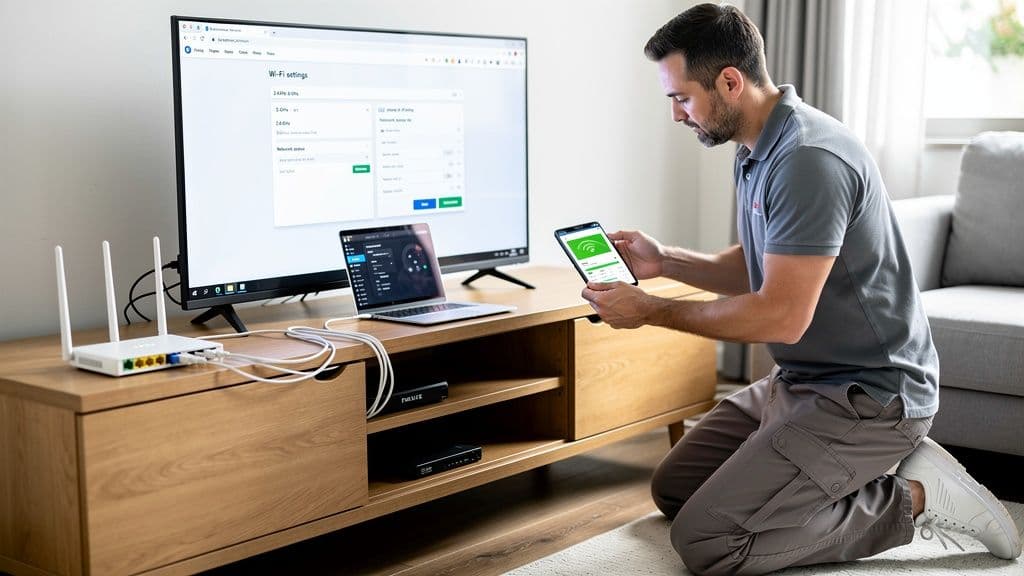
Why Does Wi-Fi Keep Dropping?
Few technology issues are more frustrating than a Wi-Fi connection that repeatedly disconnects. Whether you're working remotely, streaming movies, attending video calls, or managing smart home devices, unstable internet can disrupt everything.
Many people assume the internet provider is responsible, but in reality the problem often comes from the local network inside the home or office. Routers, signal coverage, configuration, and interference can all affect connection reliability.
Today’s homes rely on Wi-Fi for dozens of devices including laptops, phones, smart TVs, printers, cameras, and voice assistants. When the network is not properly configured or the equipment is outdated, these devices compete for bandwidth and cause connections to drop unexpectedly.
Common Causes of Unstable Wi-Fi
Several common issues can cause a Wi-Fi connection to disconnect frequently.
Poor router placement is one of the most common problems. When routers are placed inside cabinets, behind furniture, or in corners of the house, the signal cannot spread properly.
Another frequent issue is outdated networking equipment. Routers that are more than four or five years old may not support modern internet speeds or the large number of connected devices used in most homes today.
Interference from nearby Wi-Fi networks, microwaves, cordless phones, and other electronics can also weaken signal stability.
Finally, incorrect configuration or outdated firmware can cause performance problems that lead to intermittent disconnections.
How to Fix Frequent Wi-Fi Disconnections
Improving router placement is usually the first step toward fixing unstable internet. A router should ideally be placed in a central location, elevated from the floor, and away from thick walls or metal objects.
Updating router firmware is another important step. Manufacturers release updates that improve performance, stability, and security.
Restarting networking equipment occasionally can also help clear temporary connection issues.
For larger homes or buildings with multiple floors, installing a mesh Wi-Fi system or additional access points can greatly improve coverage and eliminate dead zones where devices lose connection.
When It May Be Time to Upgrade Your Network
If internet problems persist even after basic troubleshooting, your home network may need an upgrade.
Modern homes with many smart devices, streaming services, and remote work setups require networks that can handle higher demand. Upgrading to newer routers or mesh systems can improve both speed and reliability.
Professional network evaluation can also identify hidden issues such as signal interference, incorrect configuration, or poor coverage areas that may not be obvious at first.
Why Professional Wi-Fi Optimization Helps
A reliable network involves more than installing a new router. Proper network setup includes evaluating equipment, analyzing signal coverage, optimizing placement, configuring security settings, and testing network performance.
Professional Wi-Fi optimization ensures that every device in the home connects reliably and receives strong signal coverage.
At CallTechCare, we provide professional Wi-Fi troubleshooting and network optimization services for homes and small businesses across Miami and South Florida.
Our goal is to make sure your internet connection remains fast, secure, and reliable so you can focus on work, entertainment, and daily tasks without constant interruptions.
Frequently Asked Questions
Why does my Wi-Fi disconnect randomly?
Random Wi-Fi disconnections are commonly caused by router placement issues, outdated equipment, interference from nearby networks, or too many connected devices sharing the same network.
Can replacing my router fix Wi-Fi problems?
Replacing an outdated router can improve performance, but proper placement and configuration are equally important for achieving stable internet connections.
How can I improve Wi-Fi coverage in my home?
Improving Wi-Fi coverage usually involves repositioning the router, upgrading equipment, installing mesh Wi-Fi systems, or adding additional access points to eliminate dead zones.
Need help fixing unstable internet?
CallTechCare provides professional Wi-Fi troubleshooting and network optimization services to keep your connection fast, secure, and reliable.

Why Your Wi-Fi Is Slow (Even If You Pay for Fast Internet)
Paying for fast internet but still experiencing slow Wi-Fi? Learn the real…

Securing Your Home and Business With a VPN in 2026
Learn why using a VPN in 2026 is essential for protecting home and small…

How to Secure Your Home Wi‑Fi Network in 2026
Learn how to secure your home or small-business WiFi network in 2026 with…

Why Reliable IT Support at Home Matters More Than Ever
Reliable IT support keeps your home technology running smoothly. Learn why…
Cybersecurity Survival Guide for Small Businesses in 2025
Learn how small businesses can protect systems, data, and customers in 2025…
Strong Credentials for Seniors and Small Businesses
Learn how seniors and small businesses can create strong passwords, manage…

Recognizing Phishing Scams: A Guide for Seniors & Caregivers
Learn how seniors and caregivers can recognize phishing scams, avoid online…
Should You Upgrade to Wi-Fi 6E or Stay on Wi-Fi 6?
Wi-Fi 6E promises faster speeds and less interference, but is it worth…